Posts

Showing posts with the label cisco ccna ccnp lab

Administrative Distance Vs Longest Prefix Match

please setup your lab similar to previous lab add this line to R2 router eigrp 1  passive-interface Serial0/0  network 10.1.1.0 0.0.0.255  network 172.16.2.0 0.0.0.3  no auto-summary ip route 192.168.0.0 255.255.0.0 172.16.2.1 now R2 have two routes to reach 192.168.1.1 via EIGRP with AD = 90 via static route with AD = 1 R2#sh ip route ... D     192.168.1.0/24 [90 /2323456] via 10.1.1.1, 00:05:57, FastEthernet0/0 S     192.168.0.0/16 [1 /0] via 172.16.2.1 guess.. which path will the router use to reach 192.168.1.1 ? some of you may though that it'll be static because it has AD = 1, let's test.. R2#traceroute 192.168.1.1 ..   1 10.1.1.1 4 msec 4 msec 4 msec   2 172.16.1.1 12 msec 12 msec *   unfortunately it choose to use route learn via EIGRP.. thru R3. This is because it prefer longest prefix match compare to AD destination : 192.168.1.1 EIGRP route = 192.168.1.0/24 Static route = 192.168.0.0/16 EIG...

static floating route - gns3

Image
using static route when dynamic route not available primary link between network 192.168.1.0/24 and 10.1.1.0/24 are thru R3, learn each others via EIGRP . R2 is a backup link in case the primary link is not available *this is not a complete routing solution, this lab only looking from R1 point of view to reach 10.1.1.0/24 R1 interface Loopback1 ip address 192.168.1.1 255.255.255.0 ! interface Serial0/0 ip address 172.16.2.1 255.255.255.252 clock rate 56000 ! interface Serial0/1 ip address 172.16.1.1 255.255.255.252 clock rate 56000 ! router eigrp 1 network 10.0.0.0 network 172.16.1.0 0.0.0.3 network 192.168.1.0 no auto-summary ! ip route 10.1.1.0 255.255.255.0 172.16.2.2 190 ! R2 interface FastEthernet0/0 ip address 10.1.1.2 255.255.255.0 duplex auto speed auto ! interface Serial0/0 ip address 172.16.2.2 255.255.255.252 clock rate 56000 ! ip route 192.168.0.0 255.255.0.0 172.16.2.1 R3 interface FastEthernet0/0 ip address 10.1.1.1 255.255.255.0 duplex auto speed auto ! int...

a few useful show IP command..

sh ip route R1#sh ip route Codes: C - connected, S - static, R - RIP, M - mobile, B - BGP        D - EIGRP, EX - EIGRP external, O - OSPF, IA - OSPF inter area         N1 - OSPF NSSA external type 1, N2 - OSPF NSSA external type 2        E1 - OSPF external type 1, E2 - OSPF external type 2        i - IS-IS, su - IS-IS summary, L1 - IS-IS level-1, L2 - IS-IS level-2        ia - IS-IS inter area, * - candidate default, U - per-user static route        o - ODR, P - periodic downloaded static route Gateway of last resort is not set      172.16.0.0/30 is subnetted, 2 subnets C       172.16.1.0 is directly connected, Serial0/1 C       172.16.2.0 is directly connected, Serial0/0      10.0.0.0/24 is subnetted, 1 subnets D       10.1.1.0 [90/2195456] via 172.16.1.2, 00:02:01, Ser...

EIGRP route summarization, default gateway, variance and passive-interface

Image
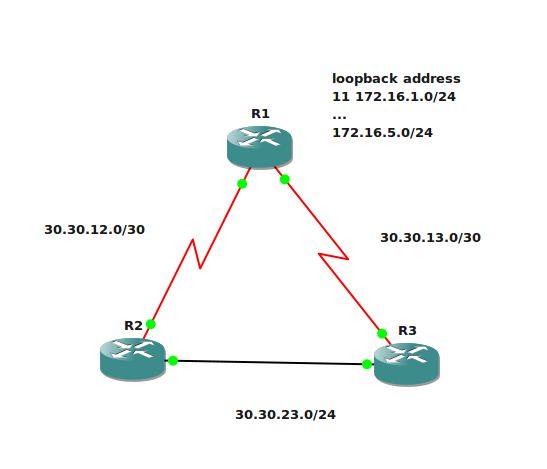
this lab will cover route summarization, default gateway using network-default command, variance and EIGRP passive-interface concept R1 interface Loopback11  ip address 172.16.1.1 255.255.255.0 ! interface Loopback12  ip address 172.16.2.1 255.255.255.0 ! interface Loopback13  ip address 172.16.3.1 255.255.255.0 ! interface Loopback14  ip address 172.16.4.1 255.255.255.0 ! interface Loopback15  ip address 172.16.5.1 255.255.255.0 interface Serial0/0  ip address 30.30.12.1 255.255.255.252  clock rate 56000 interface Serial0/1  ip address 30.30.13.1 255.255.255.252  clock rate 56000 router eigrp 1  network 30.0.0.0  network 172.16.0.0  no auto-summary R2 interface FastEthernet0/0  ip address 30.30.23.1 255.255.255.0  duplex auto  speed auto ! interface Serial0/0  ip address 30.30.12.2 255.255.255.252  clock rate 2000000 router eigrp 1  network 30.0.0.0  no auto-summary R...

EIGRP filtering route - GNS3

Image
R1 router eigrp 1  network 10.0.0.0  network 30.0.0.0  no auto-summary R2 router eigrp 1  network 30.30.12.2 0.0.0.0  network 172.16.0.0  no auto-summary R3 router eigrp 1  network 30.30.13.2 0.0.0.0  network 192.168.0.0 0.0.255.255  no auto-summary *we didn't advertise direct link between R2 and R3, just let it be that way for now make sure show ip route on R1, R2 and R3 can show all the network advertised by all the 3 routers. Distribute List + Access list we'll start with filtering certain route that EIGRP receive on particular interface  let's stop 192.168.1.0 - 192.168.5.0 from being learned on Serial 0/1 on R1, R2 also should not see this since R2 learn it via R1 show current IP route R1#sh ip rou ... D    192.168.4.0/24 [90/2297856] via 30.30.13.2, 00:12:16, Serial0/1 D    192.168.5.0/24 [90/2297856] via 30.30.13.2, 00:12:16, Serial0/1 .. D    192.168.1.0/24 [90/2297856] via 30.30.13.2, ...

EIGRP metric

Image
prepare the config as below  R1 interface Loopback0  ip address 10.10.10.1 255.255.255.255 ! interface Loopback1  ip address 10.239.1.1 255.255.255.0 ! interface Loopback2  ip address 10.239.2.1 255.255.255.0 ! interface Loopback3  ip address 10.239.3.1 255.255.255.0 ! interface Loopback4  ip address 10.239.4.1 255.255.255.0 ! interface Loopback5  ip address 10.239.5.1 255.255.255.0 ! interface Loopback6  ip address 10.239.6.1 255.255.255.0 ! interface Loopback7  ip address 10.239.7.1 255.255.255.0 ! interface Loopback8  ip address 10.239.8.1 255.255.255.0 ! interface Loopback9  ip address 10.239.9.1 255.255.255.0 ! interface Serial0/0  bandwidth 128  ip address 10.1.12.1 255.255.255.252  clock rate 128000 ! interface Serial0/1  bandwidth 128  ip address 10.1.13.1 255.255.255.252  clock rate 128000 ! router eigrp 1  network 10.1.0.0 0.0.255.255  network 10.10.10.1 0.0.0.0  netwo...