Posts

Showing posts with the label gn3 lab tutorial

ASA802 Win7 GNS3 8.2

Image
Prepare below two files asa802-k8.initrd.gz http://www.mediafire.com/?t95719uwv6m8aif asa802-k8.kernel http://www.mediafire.com/?j6z9gn9r3cgmgbn Open GNS3, point below option (in yellow) to this two files Start ASA, console and type below command modprobe e1000 ifconfig eth0 up ifconfig eth1 up ifconfig eth2 up ifconfig eth3 up ifconfig eth4 up ifconfig eth5 up cp /asa/bin/lina /mnt/disk0/lina cp /asa/bin/lina_monitor /mnt/disk0/lina_monitor cd /mnt/disk0 /mnt/disk0/lina_monitor

Administrative Distance Vs Longest Prefix Match

please setup your lab similar to previous lab add this line to R2 router eigrp 1  passive-interface Serial0/0  network 10.1.1.0 0.0.0.255  network 172.16.2.0 0.0.0.3  no auto-summary ip route 192.168.0.0 255.255.0.0 172.16.2.1 now R2 have two routes to reach 192.168.1.1 via EIGRP with AD = 90 via static route with AD = 1 R2#sh ip route ... D     192.168.1.0/24 [90 /2323456] via 10.1.1.1, 00:05:57, FastEthernet0/0 S     192.168.0.0/16 [1 /0] via 172.16.2.1 guess.. which path will the router use to reach 192.168.1.1 ? some of you may though that it'll be static because it has AD = 1, let's test.. R2#traceroute 192.168.1.1 ..   1 10.1.1.1 4 msec 4 msec 4 msec   2 172.16.1.1 12 msec 12 msec *   unfortunately it choose to use route learn via EIGRP.. thru R3. This is because it prefer longest prefix match compare to AD destination : 192.168.1.1 EIGRP route = 192.168.1.0/24 Static route = 192.168.0.0/16 EIG...

static floating route - gns3

Image
using static route when dynamic route not available primary link between network 192.168.1.0/24 and 10.1.1.0/24 are thru R3, learn each others via EIGRP . R2 is a backup link in case the primary link is not available *this is not a complete routing solution, this lab only looking from R1 point of view to reach 10.1.1.0/24 R1 interface Loopback1 ip address 192.168.1.1 255.255.255.0 ! interface Serial0/0 ip address 172.16.2.1 255.255.255.252 clock rate 56000 ! interface Serial0/1 ip address 172.16.1.1 255.255.255.252 clock rate 56000 ! router eigrp 1 network 10.0.0.0 network 172.16.1.0 0.0.0.3 network 192.168.1.0 no auto-summary ! ip route 10.1.1.0 255.255.255.0 172.16.2.2 190 ! R2 interface FastEthernet0/0 ip address 10.1.1.2 255.255.255.0 duplex auto speed auto ! interface Serial0/0 ip address 172.16.2.2 255.255.255.252 clock rate 56000 ! ip route 192.168.0.0 255.255.0.0 172.16.2.1 R3 interface FastEthernet0/0 ip address 10.1.1.1 255.255.255.0 duplex auto speed auto ! int...

a few useful show IP command..

sh ip route R1#sh ip route Codes: C - connected, S - static, R - RIP, M - mobile, B - BGP        D - EIGRP, EX - EIGRP external, O - OSPF, IA - OSPF inter area         N1 - OSPF NSSA external type 1, N2 - OSPF NSSA external type 2        E1 - OSPF external type 1, E2 - OSPF external type 2        i - IS-IS, su - IS-IS summary, L1 - IS-IS level-1, L2 - IS-IS level-2        ia - IS-IS inter area, * - candidate default, U - per-user static route        o - ODR, P - periodic downloaded static route Gateway of last resort is not set      172.16.0.0/30 is subnetted, 2 subnets C       172.16.1.0 is directly connected, Serial0/1 C       172.16.2.0 is directly connected, Serial0/0      10.0.0.0/24 is subnetted, 1 subnets D       10.1.1.0 [90/2195456] via 172.16.1.2, 00:02:01, Ser...

EIGRP route summarization, default gateway, variance and passive-interface

Image
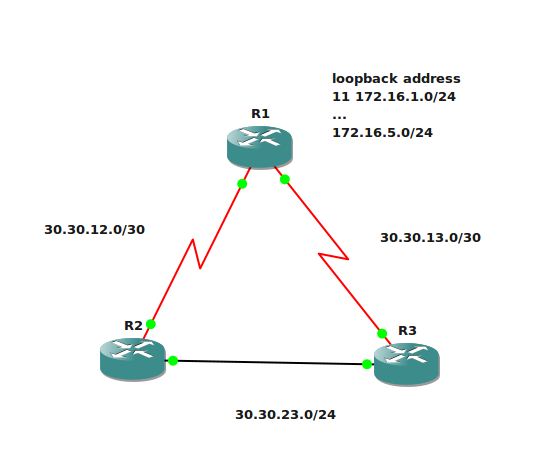
this lab will cover route summarization, default gateway using network-default command, variance and EIGRP passive-interface concept R1 interface Loopback11  ip address 172.16.1.1 255.255.255.0 ! interface Loopback12  ip address 172.16.2.1 255.255.255.0 ! interface Loopback13  ip address 172.16.3.1 255.255.255.0 ! interface Loopback14  ip address 172.16.4.1 255.255.255.0 ! interface Loopback15  ip address 172.16.5.1 255.255.255.0 interface Serial0/0  ip address 30.30.12.1 255.255.255.252  clock rate 56000 interface Serial0/1  ip address 30.30.13.1 255.255.255.252  clock rate 56000 router eigrp 1  network 30.0.0.0  network 172.16.0.0  no auto-summary R2 interface FastEthernet0/0  ip address 30.30.23.1 255.255.255.0  duplex auto  speed auto ! interface Serial0/0  ip address 30.30.12.2 255.255.255.252  clock rate 2000000 router eigrp 1  network 30.0.0.0  no auto-summary R...