Posts

Command rejected: Po1 not a switching port on Cisco Catalyst 4500

check the etherchannel status SW1#show eth sum Flags:  D - down        P - bundled in port-channel         I - stand-alone s - suspended         H - Hot-standby (LACP only)         R - Layer3       S - Layer2         U - in use       f - failed to allocate aggregator         M - not in use, minimum links not met         u - unsuitable for bundling         w - waiting to be aggregated Number of channel-groups in use: 1 Number of aggregators:           1 Group  Port-channel  Protocol    Ports ------+-------------+-----------+--...

3 method configuring default route on hub-spoke network - GNS3

Image
ip default-network ip route ip default-gateway this example we’ll use RIP, you can also use EIGRP but not OSPF prepare the network R1 interface FastEthernet0/0 ip address 10.1.1.1 255.255.255.0 duplex auto speed auto ! interface Serial0/0 ip address 192.168.1.1 255.255.255.0 clock rate 64000 ! interface Serial0/1 ip address 172.16.1.1 255.255.255.0 clock rate 64000 ! router rip network 172.16.0.0 network 192.168.1.0 R2 interface Serial0/0 ip address 192.168.1.2 255.255.255.0 ! router rip network 172.16.0.0 network 192.168.1.0 R3 interface Serial0/0 ip address 172.16.1.2 255.255.255.0 ! router rip network 172.16.0.0 make sure R1, R2 and R3 learn all the advertised interfaces and RIP working fine by pinging from one to other interfaces R1>sh ip rou R    99.0.0.0/8 [120/1] via 192.168.1.2, 00:00:16, Serial0/0 ...

Configure IP telephony (on Cat 3560)

Image
how to configure voice(ip phone) and data(pc) on a single switch port enable QoS SW1(config)#mls qos conf it to be access mode even tho we sending traffic from two different vlan SW1(config)#interface gigabitEthernet 0/27 SW1(config-if)#switchport mode access this is where we identified or separate those two different traffic, data and and voice SW1(config-if)#switchport access vlan 100 SW1(config-if)#switchport voice vlan 200 by default Cisco IP phone marking the voice frame using Cos and mark it as value 5 and mark all frame from the PC as 0 let say we want to priorities frame from this PC(maybe this pc belong to manager) instruct the switch to trust the CoS marking SW1(config-if)#mls qos trust cos this command to conf the switch to only trust marking from ip phone SW1(config-if)#mls qos trust device cisco-phone one might ask how switch know it is connected to phone? answer is.. CDP SW1(config-if)#do sh cdp ne Capability Codes...

EIGRP over Frame-relay

Image
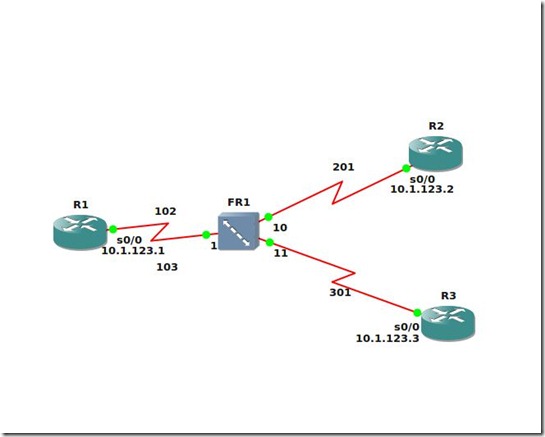
EIGRP over frame relay with two spokes and a hub R1 interface Serial0/0 ip address 10.1.123.1 255.255.255.0 encapsulation frame-relay clock rate 2000000 frame-relay map ip 10.1.123.1 102 frame-relay map ip 10.1.123.2 102 broadcast frame-relay map ip 10.1.123.3 103 broadcast no frame-relay inverse-arp router eigrp 1 network 0.0.0.0 no auto-summary R2 interface Serial0/0 ip address 10.1.123.2 255.255.255.0 encapsulation frame-relay clock rate 2000000 frame-relay map ip 10.1.123.1 201 broadcast frame-relay map ip 10.1.123.2 201 frame-relay map ip 10.1.123.3 201 broadcast no frame-relay inverse-arp router eigrp 1 network 0.0.0.0 no auto-summary R3 interface Serial0/0 ip address 10.1.123.3 255.255.255.0 encapsulation frame-relay clock rate 2000000 frame-relay map ip 10.1.123.1 301 broadcast frame-relay map ip 10.1....

3 step of MQC : Cisco Modular Quality of Service (QoS) Command Line Interface (CLI)

define a class-map - type of traffic, application, etc, to be match define a policy-map - define what to do with the matched traffic service policy - apply the policy map to the interface 1.define a class-map R2(config)#class-map ?   WORD       class-map name   match-all  Logical-AND all matching statements under this classmap   match-any  Logical-OR all matching statements under this classmap we have two option here, say we want to match two kind of traffic, citrix and http R2(config-cmap)#match protocol http R2(config-cmap)#match input-interface fastEthernet 0/0 if previously we choose all, then only http traffic that coming from fa0/0 will fall into this class-map if we choose any, then any http traffic or any traffic from fa0/0 or both kind of traffic will fall into this class-map if you don't configure any, by default is match-all. Create a class-map named MATCH-HTTP R2(config)#class-map MATCH-HT...

Tuning HSRP - GNS3

Image
configure PC, R1, R2 and R4 as below PC PC(config)#no ip routing PC(config)#int fa 0/0 PC(config-if)#ip add 10.1.1.10 255.255.255.0 PC(config-if)#no shut R1 R1(config)#interface fastEthernet 0/0 R1(config-if)#ip add 10.1.1.1 255.255.255.0 R1(config-if)#no shut R1(config)#int serial 0/0 R1(config-if)#ip add 172.16.1.2 255.255.255.252 R1(config-if)#clock rate 64000 R1(config-if)#no shut R1(config)#router eigrp 1 R1(config-router)#no auto-summary R1(config-router)#net 0.0.0.0 R2 R2(config)#int fa 0/0 R2(config-if)#ip add 10.1.1.2 255.255.255.0 R2(config-if)#no shut R2(config)#int ser 0/0 R2(config-if)#ip add 172.16.2.2 255.255.255.252 R2(config-if)#clock rate 64000 R2(config-if)#no shut R2(config)#router eigrp 1 R2(config-router)#no auto-summary R2(config-router)#net 0.0.0.0 R4 R4(config)#int ser 0/0 R4(config-if)#ip add 172.16.1.1 255.255.255.252 R4(config-if)#no shut R4(confi...

Routing Between VLANs with SVI and switch L3 routed port

Image
before we go into the SW1 and configure SVI and routed port, let’s prepare the R1 and R2 first configure addressing for R1 interfaces, and enable routing protocol R1(config)#interface fastEthernet 0/0 R1(config-if)#ip add 10.0.0.2 255.255.255.0 R1(config-if)#no shut R1(config-if)#int lo 0 R1(config-if)#ip add 10.1.1.1 255.255.255.255 R1(config)#router eigrp 1 R1(config-router)#no auto-summary R1(config-router)#net 0.0.0.0 verify all interfaces are advertised by EIGRP, do the same to check on R2 later R1(config-router)#do sh ip ei int IP-EIGRP interfaces for process 1                         Xmit Queue   Mean   Pacing Time   Multicast    Pending Interface        Peers  Un/Reliable  SRTT ...